How TradeMentory works
Your trades hold the answers.
Your AI Coach finds them.
Most traders review their trades and still can't improve. TradeMentory's AI Coach reads your journal, finds your patterns, and tells you exactly what to fix, based on your own data.
Sound familiar?
The journal trap
Most traders journal. Almost none improve from it. Here's why, and what changes with TradeMentory.
You review trades but miss the pattern
Human brains aren't wired to spot statistical patterns across 100+ trades. You see individual trades, not systemic habits.
✦ AI Coach sees patterns across all your trades
You repeat the same mistakes
You know the rules. You break them anyway. Without a system that tracks violations, the same habits persist session after session.
✦ Every rule violation is logged and quantified
You don't know what's costing you money
Is it discipline? Entry timing? Trading against your bias? Without analysis, you're guessing at the cause of your losses.
✦ AI Coach names the exact dollar cost of each habit
01
Import your trades
Import your trades
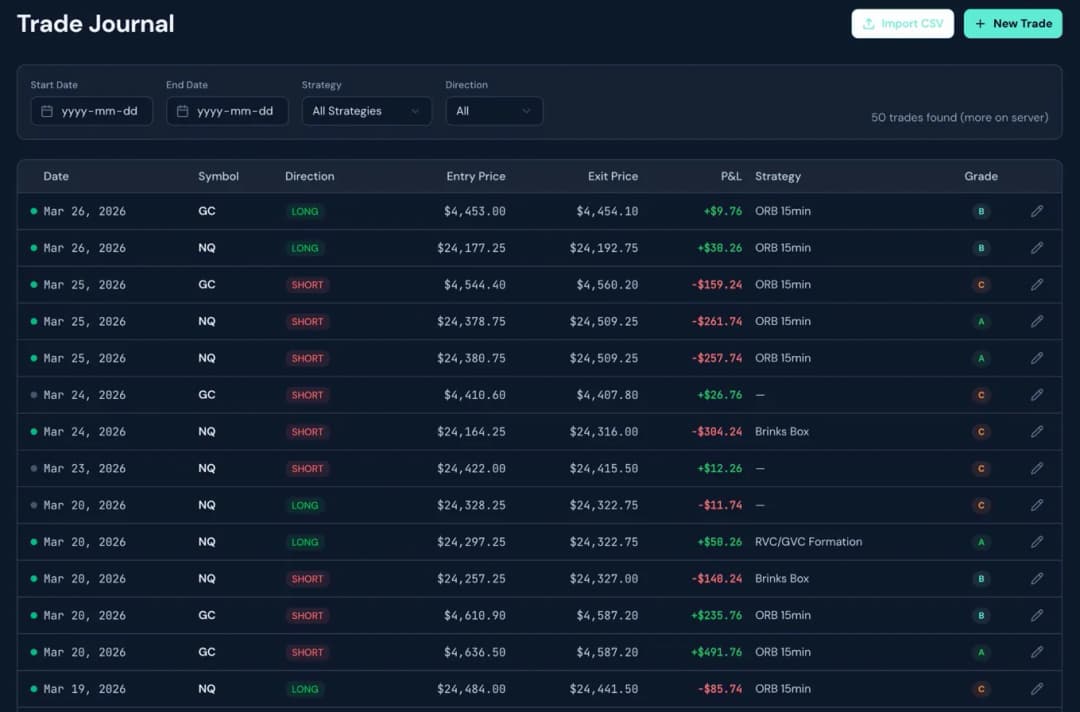
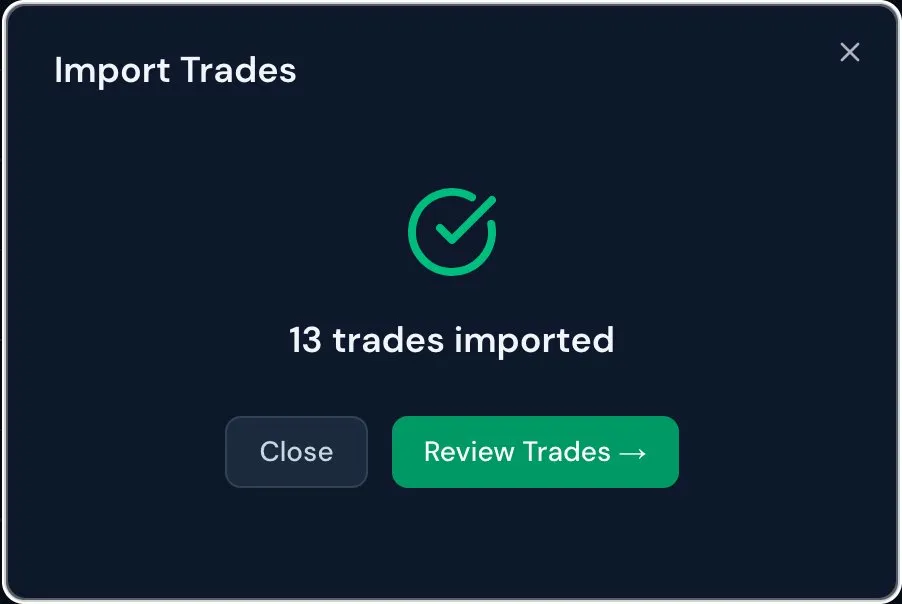
Connect your broker CSV export in seconds. TradeMentory auto-detects the format and normalises your symbols. Futures, crypto, stocks: any market.
- Drag and drop your broker CSV. No manual entry.
- Auto-detects broker format and normalises symbols
- Duplicate detection prevents double imports
- Full trade history loads in under 10 seconds
02
Review & annotate
Review & annotate
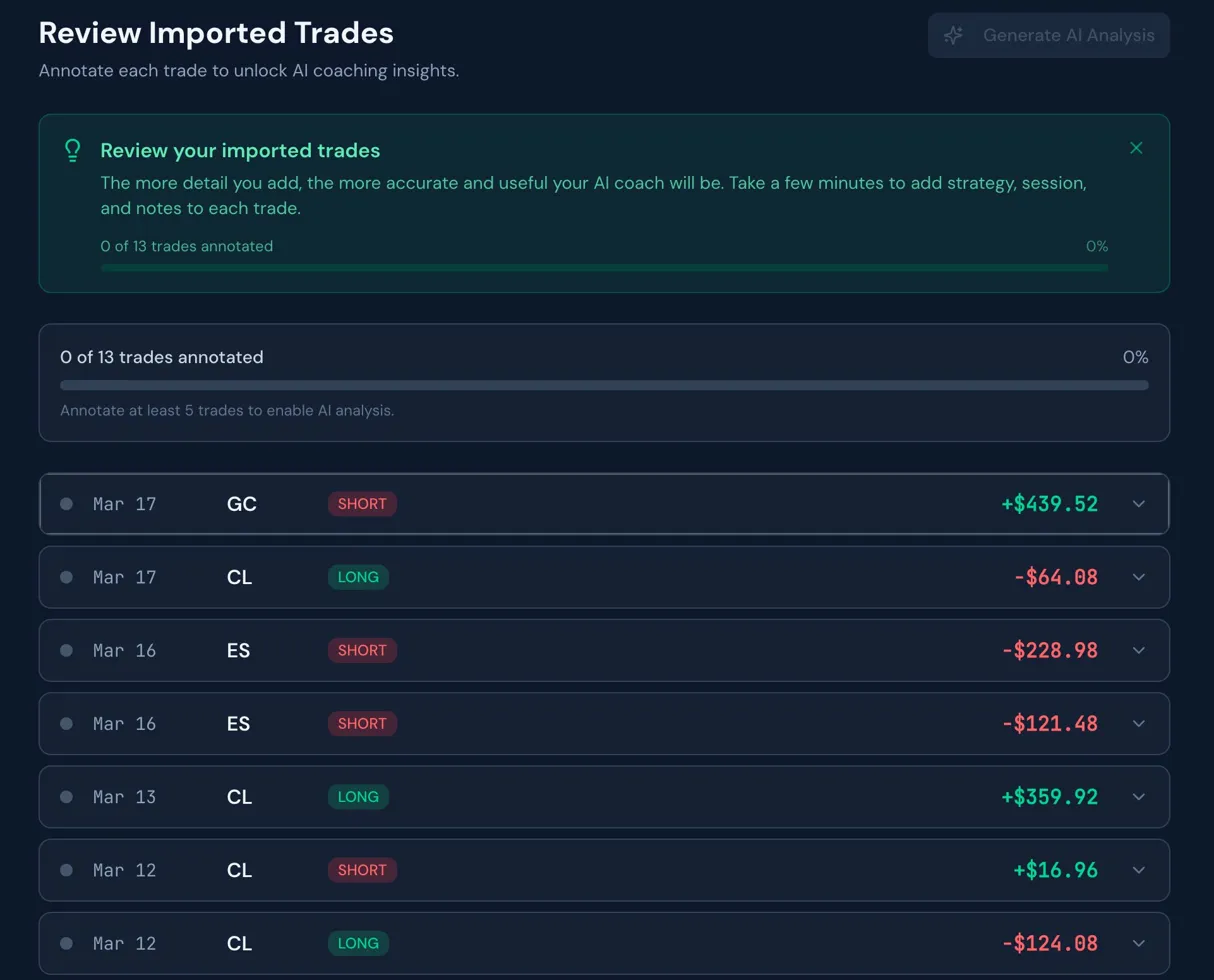
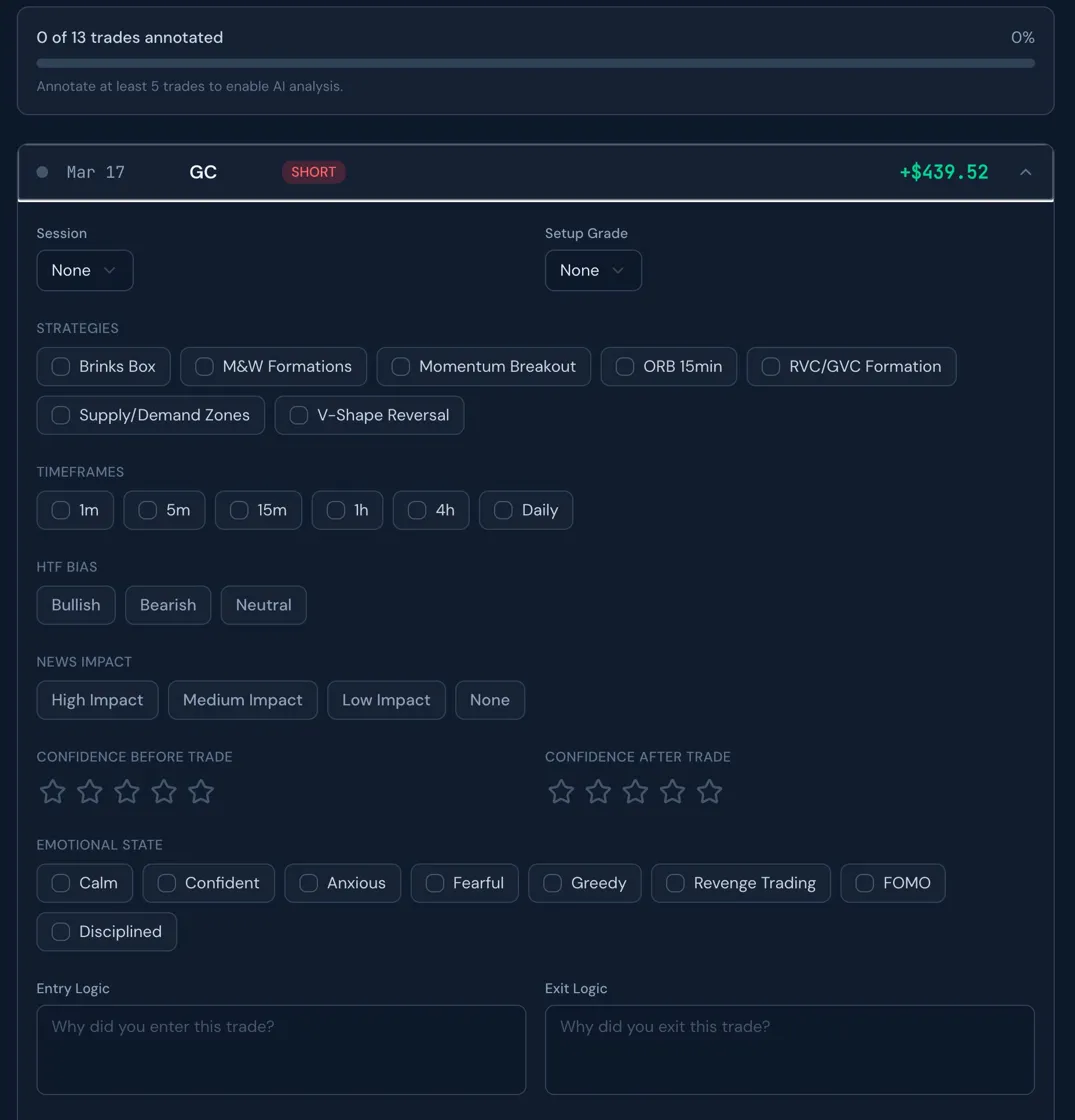
This is where coaching quality comes from. For each trade, add the context that numbers alone can't show: your strategy, emotional state, rule violations, and what you did right or wrong.
- Strategy, session, setup grade, HTF bias
- Emotional state and confidence before/after
- Rule violations with specific detail
- The more context you give, the sharper the coaching
03
Get AI Coach insights
Get AI Coach insights
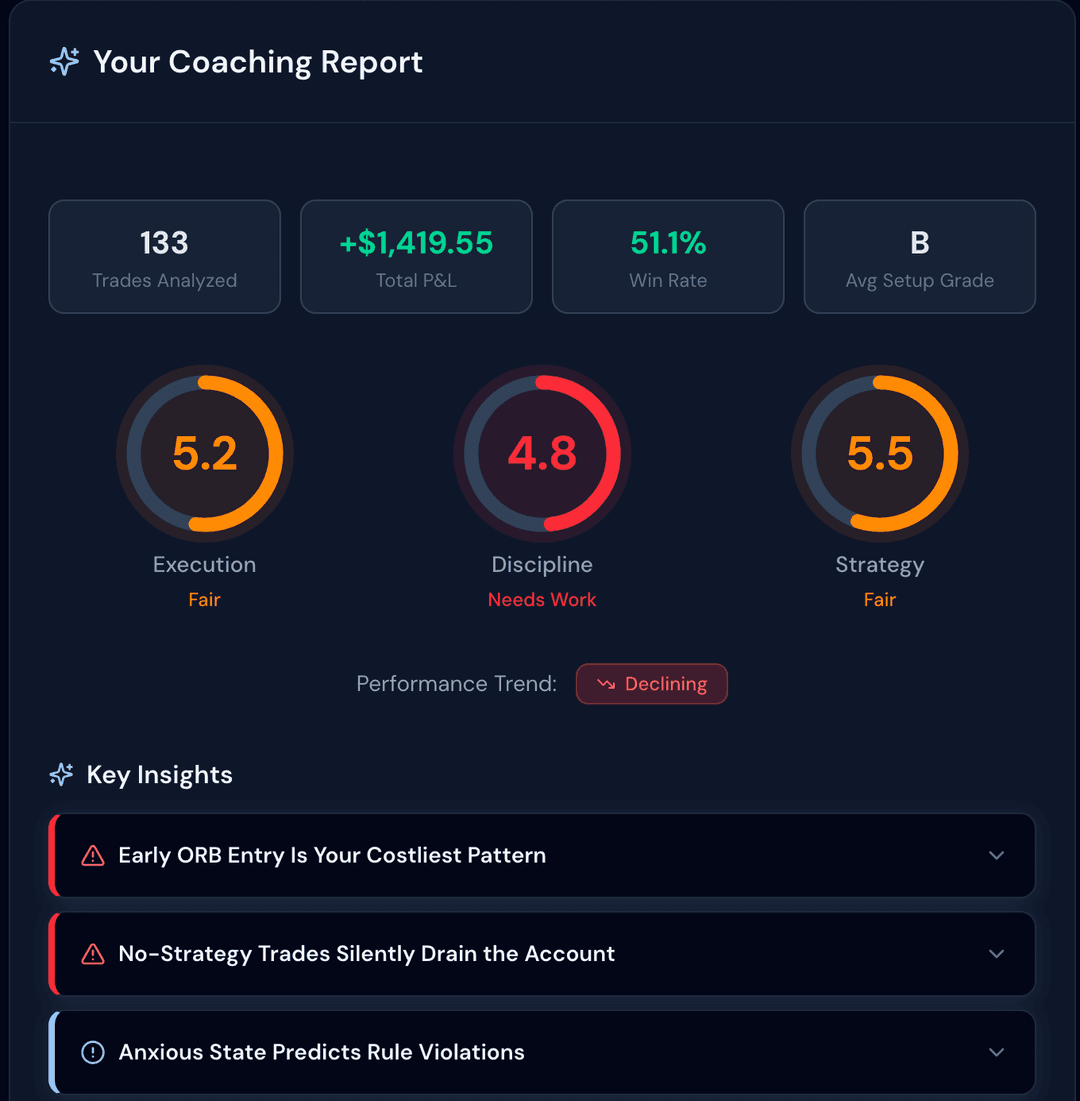
Your AI Coach analyzes every trade against two layers: your documented strategy rules and real market data fetched at the moment of entry. It doesn't rely on memory or annotations alone. It checks actual candle data, volume, and price levels to identify rule violations with surgical precision. The result is coaching grounded in what actually happened in the market.
- Execution, Discipline, and Strategy scores (0–10)
- Key insights ranked by dollar impact — critical, warning, positive
- Rule violations identified from real candle data, not just annotations
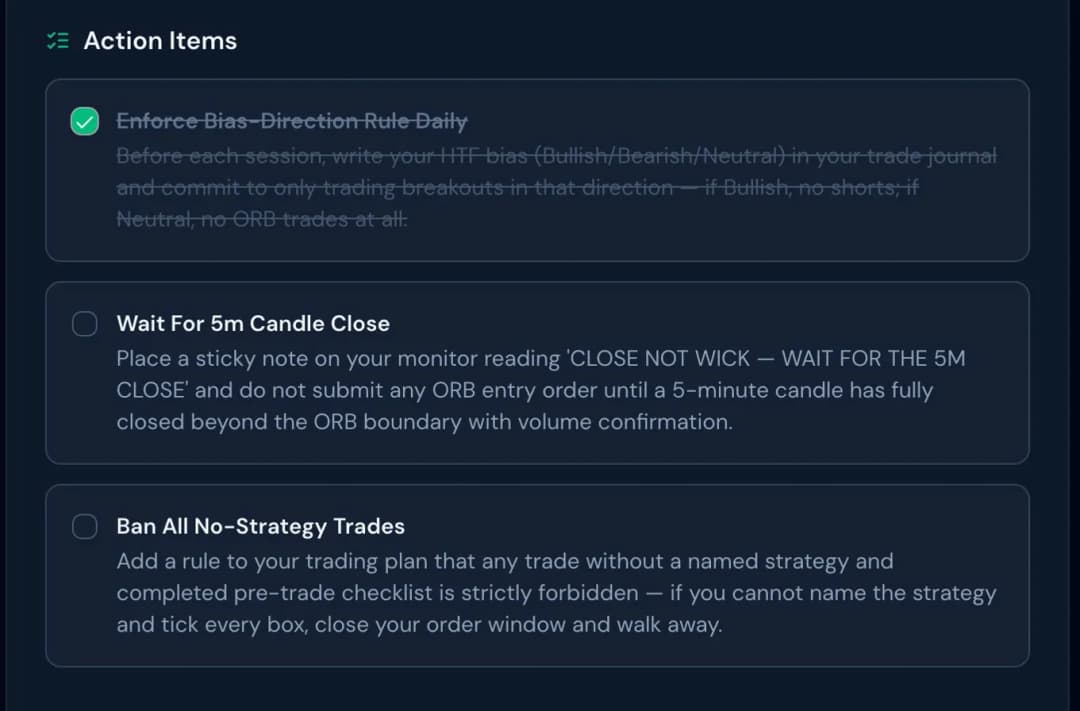
- Action items you can check off as you work on them
- Full written coaching report that persists across sessions
Not generic AI. Strategy-specific coaching.
The AI Coach knows your strategies by name.
TradeMentory's AI Coach isn't trained on generic trading theory. It's loaded with the specific rules of documented strategies: entry conditions, bias requirements, confirmation signals, and common violations. When it spots a rule break, it names the rule, the trade, and the dollar cost. More strategies are added continuously.
ORB 15min
Opening Range Breakout. Entry only after 15min range forms with bias confirmation.
M&W Formations
Market maker trap patterns at major cycle starts and reversals.
Brinks Box
First-hour NY session range (9:00–10:00 AM ET) breakout system.
VWAP Trading
Mean reversion and breakout entries using VWAP as the primary intraday level for bias and execution.
V-Shape Reversal
Extreme sweep and reversal at session highs and lows.
Supply/Demand Zones
Institutional order block entries at key S/D levels.
ICT Models
AMD, Silver Bullet, Judas Swing + more
Volume Profile
Mean Reversion, Vacuum Model, Trend Breakout
+ More strategies
New strategies added regularly. Custom strategies supported.
CHALLENGE ZONE
Built to keep prop firm traders alive
Most traders fail their challenge not from bad strategy — from bad risk management under pressure. The Challenge Room tracks every metric your firm cares about, before you breach them.
Drawdown tracking in real time
Logs every trade against your account's trailing drawdown limit. Shows exactly how much buffer you have left — in dollars, not percentages.
Daily risk ceiling
Calculates your maximum loss for the day based on remaining drawdown and account health. Updates after every session.
Per-trade budget
Divides your daily ceiling by your typical trade pace. Tells you the maximum you should risk per trade to stay on track for the week.
Behavioral risk patterns
Detects crisis periods — 3+ consecutive sessions deviating from your baseline. Flags when you're overtrading, oversizing, or changing your strategy mix under stress.
ACCOUNT HEALTH
Drawdown remaining
$2,340
Daily risk ceiling
$187
Per-trade budget
$62
Account status
Survival ModeBEHAVIORAL SIGNAL
3 consecutive sessions above baseline size — crisis period active
Challenge Room is available on all accounts. Supports Apex, Bulenox, Topstep, FTMO, Leeloo, MyFundedFutures, TradeDay, Earn2Trade, Lucid.
Two layers of analysis. Zero guesswork.
Your AI Coach combines what you write in your journal with real market data fetched automatically at the moment of each trade. This means rule violations are identified from actual candle data, not just from what you remember writing down. A trader with zero annotations can receive a report that says 'your 3 Brinks Box entries all failed vector candle confirmation, costing −$161' — because the system saw the actual candles.
FAQ
Common questions
Which brokers and markets are supported?
TradeMentory imports CSV exports from any broker. It currently auto-detects TopStep, Tradovate, Notion, and Airtable formats. Futures, crypto, and stocks are all supported. If your broker format isn't recognised, send us the CSV and we'll add it within 48 hours.
How is my trading data used?
Your trade data is private to your account and only used to generate your coaching reports. It is never shared, sold, or used to train AI models. All data is stored with row-level security: only you can access your trades.
How specific is the coaching? Will it just give generic advice?
The coaching references your actual trades by date and symbol, and now cross-references real market data at the time of each entry. For example: 'Mar 25 NQ SHORT x2 — entry candle was not a red vector, volume was below average, HTF bias was Bullish — combined loss: −$519.48.' It names the specific rule violated, what the market data showed, and the dollar cost. Generic advice is exactly what TradeMentory is designed to replace.
Do I need to annotate every trade?
Yes — annotation is how TradeMentory knows what you were thinking when you took the trade. The more detail you add (entry logic, exit logic, emotional state, what you did right and wrong), the sharper and more specific the AI Coach becomes. That said, TradeMentory also reads real market data — actual candles, volume, and price levels at the exact moment of your entry — so even partially annotated trades get cross-referenced against what the market was actually doing. Annotation drives the coaching quality. Market data fills in the context.
What's the difference between Free and Pro?
Free gives you unlimited trade journal entries, CSV import, and 1 AI Coach analysis per day. Pro unlocks unlimited analyses, unlimited trades, full Trading Zone access, and the Challenge Room. Pro launches September 2026 — join the waitlist to lock in early access pricing.
Does the Challenge Room work with my prop firm?
Yes — TradeMentory has pre-loaded rules for Apex, Bulenox, Topstep, FTMO, Leeloo, MyFundedFutures, TradeDay, Earn2Trade, and Lucid. Select your firm and account size in Settings and the drawdown limits, daily loss rules, and trailing thresholds are set automatically.
How does the daily risk ceiling get calculated?
The ceiling is derived from your remaining drawdown balance and account health score. On a healthy account it allows more room. As your balance approaches the drawdown limit, the ceiling tightens automatically — the same way a professional risk manager would restrict a trader under pressure.
What is Survival Mode?
Survival Mode activates when your account health drops below a threshold — typically when remaining drawdown falls under 30% of the original limit. In this state, position sizing is cut significantly and the AI Coach flags any trade that exceeds the reduced budget. The goal is to keep you in the challenge long enough to recover.
Ready to find out what's actually holding you back?
Import your first trades in 2 minutes — or explore the demo account to see every feature in action before you sign up.